# Search

## ***Search for a token listed on Tokamak Bridge***

1. In order to search tokens, open the card selection interface and click on the search bar located at the bottom of the screen.&#x20;

<figure><img src="https://3565366697-files.gitbook.io/~/files/v0/b/gitbook-x-prod.appspot.com/o/spaces%2Fl0dwiwSNGrEYCAvrI0ht%2Fuploads%2FMLDUyjnRiutv4lNxTPPE%2F15.png?alt=media&#x26;token=3fcc8fdd-db6a-40b1-837d-4cb966fd3041" alt=""><figcaption><p>Search for a token using the search bar located on the bottom of the page.</p></figcaption></figure>

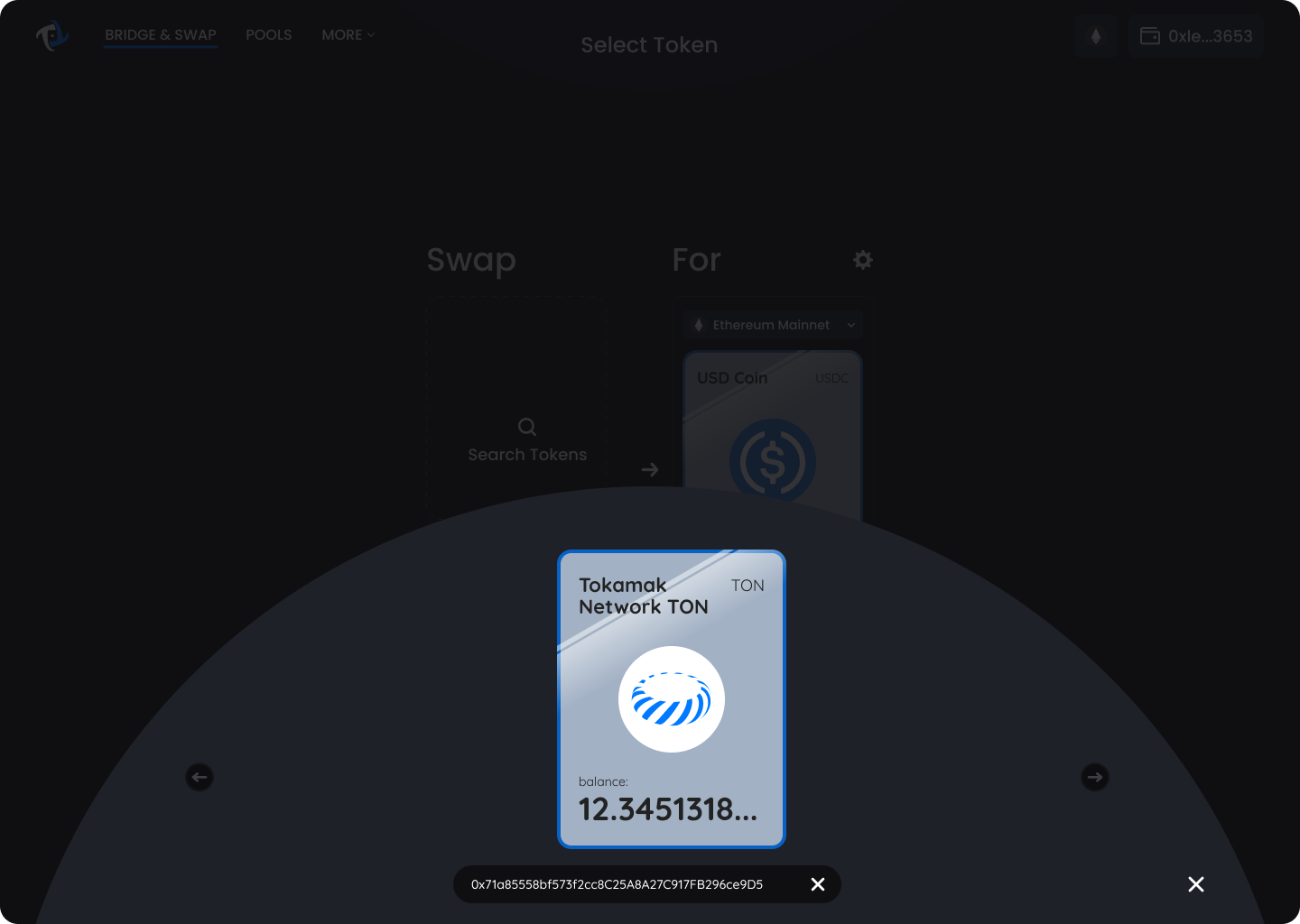
2. Enter the token address that you would like to search for.&#x20;

<figure><img src="https://3565366697-files.gitbook.io/~/files/v0/b/gitbook-x-prod.appspot.com/o/spaces%2Fl0dwiwSNGrEYCAvrI0ht%2Fuploads%2Fq74tOgi8Ppd2xyCX0uhW%2F17.png?alt=media&#x26;token=4e16379a-8e7a-4a2b-8621-196027c510b5" alt=""><figcaption><p>Select the token to be used in Tokamak Bridge</p></figcaption></figure>

## ***Add a token that is not listed on Tokamak Bridge***

{% hint style="info" %}
To officially add a token to Tokamak Bridge, fill out the "[Tokamak Bridge Token Support Request form](https://forms.gle/actJrRuAtHT7ycG5A)".
{% endhint %}

1. In order to add a token not listed on Tokamak Bridge, open the card selection interface and click on the search bar located at the bottom of the screen.&#x20;

<figure><img src="https://3565366697-files.gitbook.io/~/files/v0/b/gitbook-x-prod.appspot.com/o/spaces%2Fl0dwiwSNGrEYCAvrI0ht%2Fuploads%2FMLDUyjnRiutv4lNxTPPE%2F15.png?alt=media&#x26;token=3fcc8fdd-db6a-40b1-837d-4cb966fd3041" alt=""><figcaption><p>Search for a token using the search bar located on the bottom of the page.</p></figcaption></figure>

2. Enter the desired token address.
3. Agree to the warning message; “This token isn’t swapped on leading U.S. centralized exchanges or frequently swapped on Tokamak Bridge. Always conduct your own research before trading.”

<figure><img src="https://3565366697-files.gitbook.io/~/files/v0/b/gitbook-x-prod.appspot.com/o/spaces%2Fl0dwiwSNGrEYCAvrI0ht%2Fuploads%2FiOmqjc6kucVILDPE8a8F%2F16.png?alt=media&#x26;token=1a19dfc1-3d54-4494-a575-70b18106f4e8" alt=""><figcaption><p>Check the warning</p></figcaption></figure>

3. Select the token to be used in Tokamak Bridge.

<figure><img src="https://3565366697-files.gitbook.io/~/files/v0/b/gitbook-x-prod.appspot.com/o/spaces%2Fl0dwiwSNGrEYCAvrI0ht%2Fuploads%2Fq74tOgi8Ppd2xyCX0uhW%2F17.png?alt=media&#x26;token=4e16379a-8e7a-4a2b-8621-196027c510b5" alt=""><figcaption><p>Select the token to be used in Tokamak Bridge</p></figcaption></figure>